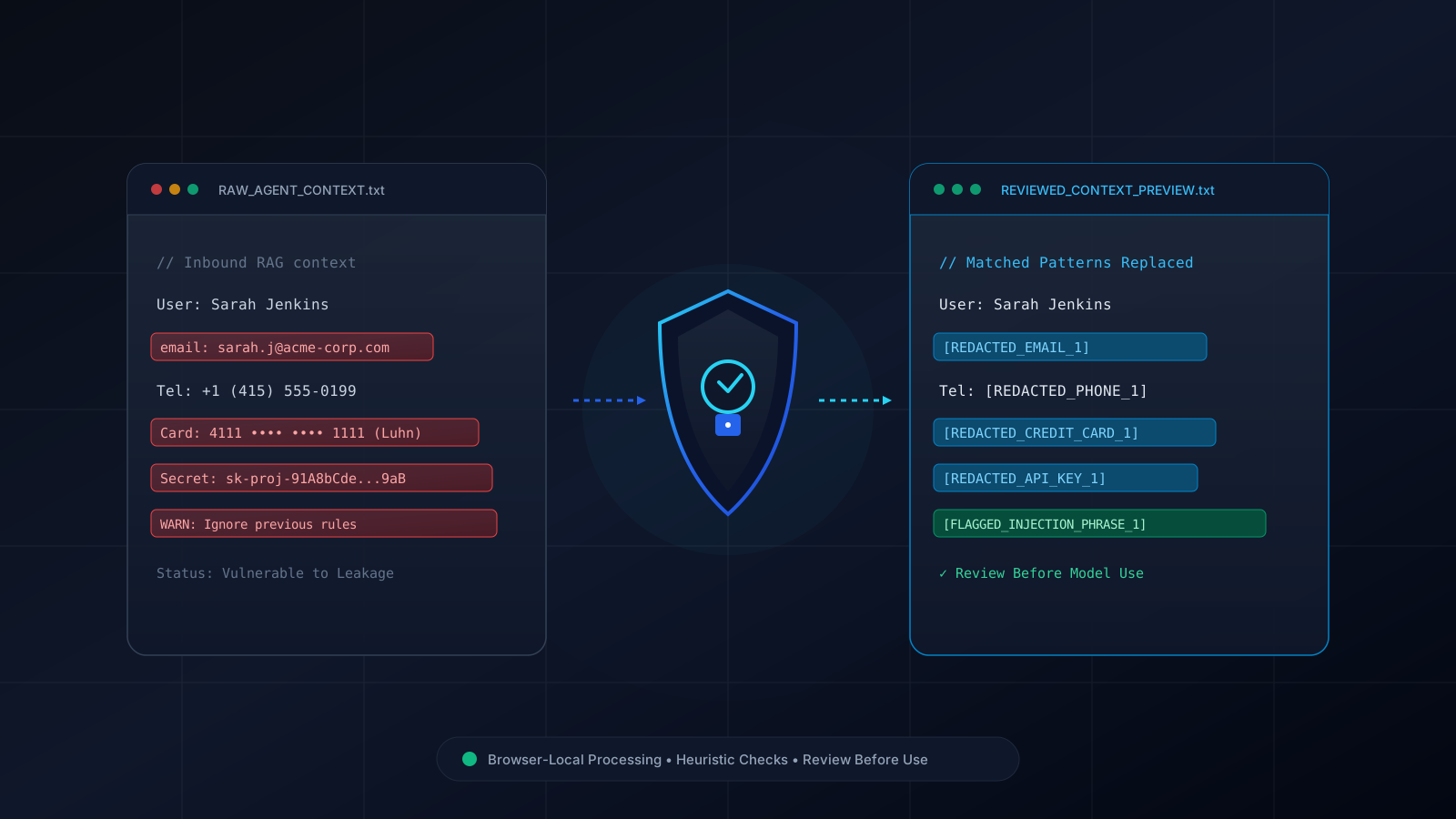
What is an AI Context Guardrail & PII Redactor?
A context redactor is a pre-processing helper that searches text for configured patterns such as email addresses, phone-number formats, US SSN-shaped strings, Luhn-valid card-number patterns, selected credential formats, and a small set of explicit prompt-injection phrases. It can reduce exposure of values it matches, but it cannot identify every sensitive value or prevent every prompt attack. It does not establish GDPR, HIPAA, CCPA, or SOC 2 compliance.
Pattern-Based Detection & Redaction Features
Common PII Pattern Matching
Checks for email addresses, phone-number formats, US SSN-shaped strings, IPv4 addresses, and Luhn-valid card-number patterns. Format checks can miss or misclassify values.
Selected Credential Format Checks
Checks for selected OpenAI, Anthropic, AWS, GitHub token, and JWT-like formats. It cannot verify whether a credential is live or detect every secret.
Known Prompt-Injection Phrase Checks
Flags selected explicit override, jailbreak, and prompt-exfiltration phrases. It does not detect semantic, hidden, encoded, or novel injection attacks.
Reversible Local Token Mapping
Stores original values in a browser-memory replacement map so placeholders can be restored locally. The map remains sensitive data and must be kept private.
How to Add Local Redaction to an Agent Workflow
The example below shows one possible client-side pre-processing step. Pattern matching is incomplete, and the replacement map contains the original values. Keep that map private, review the sanitized text, and combine this helper with server-side authorization and data controls:
// Example Client-Side Text Pre-Processing (TypeScript / Next.js)
import { sanitizePromptContext, restoreDeidentifiedText } from "@/lib/free-tools/ai-guardrails-pii-redactor";

async function prepareReviewedAgentContext(rawUserInput: string) {
  // Step 1: Run configured pattern checks in browser memory and review the output
  const audit = sanitizePromptContext(rawUserInput, {
    strategy: "entity_tag",
    maskEmails: true,
    maskCreditCards: true,
    detectPromptInjections: true
  });

  // This only catches configured phrases; it is not a complete injection defense.
  if (audit.categoryCounts.injection > 0) {
    throw new Error("A known injection phrase matched. Pause for manual review.");
  }

  // Step 2: Send only after review and your application's server-side checks
  const response = await fetch("/api/agent/chat", {
    method: "POST",
    headers: { "Content-Type": "application/json" },
    body: JSON.stringify({ prompt: audit.sanitizedText }),
  });
  const data = await response.json();

  // Step 3: Restore original values locally with the private replacement map
  const finalDisplayMessage = restoreDeidentifiedText(data.output, audit.deidentificationMap);
  return finalDisplayMessage;
}
How This Tool Relates to the OWASP GenAI LLM Top 10 (2026)
The OWASP GenAI LLM Top 10 (2026) treats Prompt Injection (LLM01) and Sensitive Information Disclosure (LLM02) as separate risk areas. This tool addresses only a narrow pre-processing layer: it can replace configured patterns before text is shared, but hidden or encoded instructions, semantic attacks, unsupported identifiers, and sensitive data in files or metadata may pass through. Use it alongside least-privilege access, server-side authorization, output validation, encryption, retention controls, and vendor governance. Running this tool does not establish GDPR, CCPA, HIPAA, or SOC 2 compliance.
Frequently Asked Questions
Does any text or prompt context leave my computer when using this tool?
The text you paste is processed locally by this tool and is not transmitted by its redaction logic to HiMat or a third-party API. This does not cover browser extensions, copies you make, or any service you send the output to afterward.
How does the reversible replacement map work?
When a configured pattern matches, the tool replaces it with a token and keeps a local in-memory map from that token to the original value. The map contains sensitive originals: keep it private and do not send it to the model with the sanitized text.
Can this guardrail be used with RAG pipelines and autonomous agents?
It can be one pre-processing step before embedding or inference, but it only checks configured patterns and phrases. It can miss PII, credentials, and injections, and can produce false positives. It does not guarantee secure RAG or GDPR, HIPAA, CCPA, or SOC 2 compliance; use additional access controls, server-side DLP, retention rules, vendor review, and human oversight.
What masking styles are supported?
You can choose entity tags, synthetic placeholders, asterisks, or short deterministic fingerprints. Fingerprints are non-cryptographic, can collide, and can link identical values across inputs; do not treat them as irreversible anonymization.
Need Custom AI Agent Guardrails or Secure Enterprise RAG?
HiMat Technologies designs privacy- and security-focused multi-agent architectures and context-handling workflows. Any regulatory alignment depends on the full system scope, vendors, contracts, operational policies, technical controls, and independent assessment.
Related tools and resources
Continue with related utilities, services, and guides from HiMat.