Loading...
Back to Insights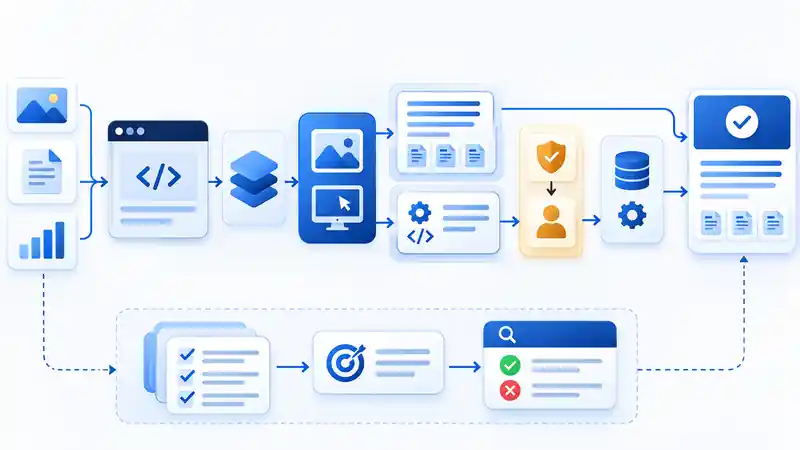
AI Model Integration & Agent Engineering
Tencent Hy4 on Vercel AI Gateway: Next.js Guide
Connect Tencent Hy4 to a Next.js app with Vercel AI Gateway. Learn model IDs, image input, tool calling, context limits and a safe evaluation workflow.
A production pattern for Hy4: the model interprets approved inputs and proposes tool calls, while the application owns authorization, execution, verification and source provenance.
Quick Answer
Tencent Hy4 is available through Vercel AI Gateway using the model ID `tencent/hy4`; Tencent Cloud TokenHub uses the shorter ID `hy4`. The November 4, 2026 release adds visual understanding and computer-use capabilities to Tencent's model family. Vercel's model reference documents image message parts, tool calling and structured outputs. Tencent's TokenHub guide lists a 1,024k context window, up to 960k input tokens and up to 64k output tokens. The model can interpret an image or request a tool call, but your application still owns authentication, tool execution, browser or desktop control, authorization, verification and human approval. Tencent's release announcement · Vercel AI Gateway model reference · Tencent TokenHub API guide.
What changed with Tencent Hy4?
Tencent announced Hy4 on November 4, 2026. The release describes stronger long-horizon agent and productivity work, visual understanding, and computer-use capability across command-line and graphical interfaces. The practical developer opportunity is not simply that a model can inspect a screenshot: it can be placed inside a controlled application workflow that combines visual evidence, typed tools and verifiable source records. Treat the capability statements as vendor-reported until you reproduce them on your own tasks. Read Tencent's announcement.
Availability: hosted API first, weights later
Tencent's announcement says model weights and system cards are planned for release in the coming days. On November 5, the official Tencent Hugging Face organization page still lists the earlier Hy4 Preview checkpoints rather than a final Hy4 release checkpoint. For a production integration today, treat Hy4 as a hosted API model; do not assume that the final release can already be self-hosted or that its final licence and system card are available. Re-check the official Tencent model organization before planning an on-premises deployment.
Where Vercel AI Gateway fits
Vercel announced Hy4 availability on AI Gateway on November 3, 2026. The gateway lets an application call the model through the AI SDK or compatible OpenAI Chat Completions, OpenAI Responses and Anthropic Messages interfaces. The model page documents the `tencent/hy4` identifier, image inputs, tool calling, structured outputs and provider-routing options. It also documents the `AI_GATEWAY_API_KEY` environment variable. Vercel's availability announcement · Model and API reference.
Keep the responsibilities separate:
| Layer | Responsibility | What it does not replace | |---|---|---| | Tencent Hy4 | Visual interpretation, reasoning and proposed tool calls | Your application's identity and authorization rules | | Vercel AI Gateway | Model API access, routing, provider options and usage visibility | A browser, desktop or shell execution sandbox | | Next.js application | Request validation, session checks, tool schemas and response handling | Independent evaluation and human review | | Tool runner | Executes approved browser, API or desktop actions in a bounded environment | Business approval for consequential actions | | Evidence store | Keeps source URLs, timestamps, extracted facts and audit records | A guarantee that model output is correct |
Choose the model ID and endpoint deliberately
| Integration surface | Model ID | Notes | |---|---|---| | Vercel AI Gateway | `tencent/hy4` | Use this identifier with the AI SDK examples on Vercel's model page. | | Tencent Cloud TokenHub | `hy4` | TokenHub documents OpenAI Chat Completions, OpenAI Responses and Anthropic Messages compatibility. | | Previous preview | `hy4-preview` or the provider-qualified preview ID | Keep preview and final model configuration separate; do not silently migrate production traffic by changing only a label. |
Tencent's TokenHub reference lists a 1,024k context window, 960k maximum input and 64k maximum output for `hy4`. Vercel's model page also lists a 1M context window and 64K output limit. These are service limits, not a recommendation to send the entire context on every request. Images count toward input usage, and the practical limit can also be affected by provider, request format and other API constraints. TokenHub limits · Vercel input and output limits.
Connect Hy4 to a Next.js route
Install the AI SDK and a schema validator, create an AI Gateway key, and store `AI_GATEWAY_API_KEY` only in the server environment. Do not put the key in a client component, public environment variable or browser bundle. The following route is an illustrative starting point; add your application's authentication, rate limiting, logging and request-size controls before deployment.
```bash pnpm add ai zod ```
```typescript // app/api/vision/route.ts import { generateText } from 'ai'; import { z } from 'zod'; const RequestSchema = z.object({ question: z.string().min(1).max(2000), imageUrl: z.string().url(), }); const allowedHosts = new Set( (process.env.ALLOWED_IMAGE_HOSTS ?? '') .split(',') .map((host) => host.trim()) .filter(Boolean), ); export async function POST(request: Request) { // Authenticate and authorize the caller before processing this request. const parsed = RequestSchema.safeParse(await request.json()); if (!parsed.success) { return Response.json({ error: 'Invalid request' }, { status: 400 }); } const imageUrl = new URL(parsed.data.imageUrl); if (!allowedHosts.has(imageUrl.hostname)) { return Response.json({ error: 'Image host is not allowed' }, { status: 400 }); } const result = await generateText({ model: 'tencent/hy4', messages: [{ role: 'user', content: [ { type: 'text', text: parsed.data.question }, { type: 'image', image: imageUrl }, ], }], }); return Response.json({ answer: result.text, usage: result.usage }); } ```
The allowlist is important. Do not accept arbitrary image URLs from a browser and pass them directly to a model provider: that can create unwanted fetches, expose private resources or make request costs difficult to control. Prefer URLs from storage you own, or retrieve an authorized file on the server and pass approved bytes as a supported image input. Vercel documents URL, base64 and `Uint8Array` image sources; image content counts as input tokens. Vercel image-input reference.
Add tools without giving the model unrestricted access
Hy4 can request a tool call, but the application decides which tools exist and what their server-side `execute` functions are allowed to do. Start with read-only tools that are scoped to the authenticated user or tenant. The example below uses an application-owned search function; replace it with your own database or retrieval layer and enforce authorization inside that function, not only in the prompt.
```typescript import { generateText, tool } from 'ai'; import { z } from 'zod'; const result = await generateText({ model: 'tencent/hy4', prompt: 'Find the approved deployment policy and summarize its source.', tools: { searchApprovedSources: tool({ description: 'Search only documents the signed-in user may access.', inputSchema: z.object({ query: z.string().min(3).max(200) }), execute: async ({ query }) => searchApprovedSourcesForUser(session.userId, query), }), }, }); ```
The `session` value and `searchApprovedSourcesForUser` function are application-specific. They must resolve the current user, enforce tenant and record permissions, limit returned fields, and preserve the canonical source URL. For a state-changing action, use a separate approval step and a server-side policy check. Do not expose a generic `runShell`, `executeAnySQL` or unrestricted browser-control tool simply because the model can reason about computer use.
Computer use is a runtime architecture, not just a model switch
Tencent describes Hy4 computer-use capability across CLI and GUI workflows. That does not mean an API call automatically gains access to a user's desktop. A real computer-use system needs an execution environment, screenshots or other state feedback, an action protocol, credential isolation, timeouts, resource limits and a way to stop or roll back. A safer flow is: capture approved state → ask the model for one bounded action → validate the proposed action → execute it in an isolated browser or virtual machine → capture the new state → verify the expected result → request human approval before consequential changes.
Use DOM or accessibility-based browser controls when they provide a reliable semantic contract; use screenshot-driven actions when the task genuinely depends on visual layout. Keep the two modes distinguishable in logs and evaluations. Himat's earlier AI browser agents guide compares structured Playwright MCP workflows with computer-use approaches, while the AI agent identity guide covers identity and least-privilege boundaries.
A GEO use case: interpret visual evidence, preserve the source
A vision-capable model can help extract information from a chart, screenshot, scanned report page or product interface. For a GEO or answer-engine workflow, however, an image interpretation is not a citation. Retrieve the original page or document, keep its canonical URL and publication date, and attach the relevant page number or evidence excerpt to every extracted claim. A robust pipeline looks like this:
```text Source URL / document ↓ Authorized retrieval + canonical metadata ↓ Text extraction and page-image selection ↓ Hy4 visual interpretation (when needed) ↓ Schema validation + claim/evidence matching ↓ Answer synthesis with source links ↓ Human review for high-impact publication or action ```
For example, an article may contain a chart that is difficult to read from text extraction alone. Hy4 can help interpret the plotted series, but the publishing workflow should store the original article URL, chart caption, publication date, extracted values, units and a reviewer decision. Keep a text explanation and accessible table alongside the image. This improves auditability and helps readers who cannot use the image; it does not guarantee a search ranking or an AI citation.
Evaluate Hy4 on your own tasks before rollout
Build a small, labelled evaluation set from real tasks before changing a production model route. Include at least these cases:
1. Screenshot reading: extract a small label, date or status from a realistic interface screenshot and compare it with a human-verified answer. 2. Chart interpretation: test axes, units, legend mapping, missing values and whether the model distinguishes a trend from a causal claim. 3. Document pages: compare a scanned page with its text extraction and require the answer to retain the page number and source. 4. Tool selection: verify that the model chooses the correct read-only tool rather than guessing or invoking a broader action. 5. Argument validation: reject missing IDs, unexpected fields, oversized strings and cross-tenant identifiers. 6. Prompt injection: place instruction-like text inside an image or document and test that it is treated as untrusted content, not as a system instruction. 7. Authorization denial: test that a user cannot retrieve another tenant's document even if the model requests it. 8. Recovery: include incomplete screenshots, ambiguous controls, timeouts and changed page state; the correct result may be to stop and ask for help.
Track outcomes rather than publishing a vendor benchmark as your own. Useful measures include field-extraction accuracy, chart-value accuracy, tool-selection accuracy, schema-validation pass rate, task-completion rate, policy-violation rate, state-verification pass rate, human-escalation rate, median and p95 latency, input/output tokens, and cost per successful task. Record the model ID, gateway/provider route, prompt version, tool version and evaluation-set version so a later model update can be compared fairly.
Production rollout checklist
1. Pin the exact model ID in configuration and keep preview and final routes separate. 2. Keep API keys and provider credentials on the server. 3. Authenticate every request and scope retrieved data to the current user or tenant. 4. Allowlist image sources and limit image size, request size and execution time. 5. Begin with read-only tools; add state-changing tools only behind explicit policy and approval. 6. Run the same labelled evaluation set before and after each model or prompt change. 7. Log evidence IDs, tool calls, approval outcomes and verification results while redacting sensitive content. 8. Keep a fallback model or manual path, and re-check provider terms, privacy policies, pricing and model availability before launch.
Useful Himat Technologies resources
For evaluation, use the AI Evaluation Dataset Generator to prepare test prompts and expected outputs. Use the LLM Tool Schema Converter when comparing tool-definition formats across providers; it is a schema-conversion helper, not a runtime authorization validator. The MCP Security & Permission Auditor can help inspect supported MCP configuration patterns, but it does not certify a model runtime or prove that a tool is safe.
Teams building this architecture can review Himat's AI Agent Development, AI Software Development and Technical SEO & GEO services. Related reading: Google Connected Apps and MCP integration, Mistral Large 4 enterprise deployment checklist, and AI browser agents: Playwright MCP vs computer use.
Frequently asked questions
What model ID should I use for Tencent Hy4?
Use `tencent/hy4` with Vercel AI Gateway. Tencent Cloud TokenHub documents the model as `hy4`. Keep the previous `hy4-preview` identifier separate from the final model configuration.
Can Tencent Hy4 accept images through Vercel AI Gateway?
Yes. Vercel's model reference documents image message parts with URL, base64 or `Uint8Array` sources. Image content counts toward input usage; validate and authorize the image source on your server.
What is Hy4's context and output limit?
Tencent TokenHub lists a 1,024k context window, a maximum of 960k input tokens and up to 64k output tokens for `hy4`. Treat these as provider limits, not a target prompt size.
Does Hy4 automatically control a browser or desktop?
No. The model can support computer-use workflows and request tools, but your application must provide a controlled browser or desktop runner, authorization, action validation, state feedback and verification.
Are final Hy4 model weights available for self-hosting?
Tencent's November 4 announcement said weights and system cards would follow in the coming days. As of November 5, the official Tencent Hugging Face organization page still showed the earlier preview checkpoints. Verify the official release files and licence before planning self-hosting.
Does Vercel AI Gateway execute tool calls?
The gateway routes model requests. The application supplies tool schemas and, where appropriate, server-side `execute` functions. Those functions must enforce identity, permissions, input validation and audit requirements.
Will using Hy4 improve GEO rankings or AI citations?
No ranking or citation improvement is guaranteed. Hy4 can help interpret visual evidence in a retrieval or content workflow, but source discovery, canonical URLs, provenance, factual verification and useful page content remain separate requirements.
Conclusion
Tencent Hy4 gives developers another option for vision-aware and tool-using workflows. The practical integration is straightforward: choose the correct model ID, call it from a server route, pass approved image inputs, and define narrowly scoped tools. The difficult work is the application around the model: identity, data access, computer-use isolation, verification, evaluation and source provenance. Build those boundaries first, measure the workflow on labelled tasks, and only then expand autonomy.
Previous Article
Dependabot for APM: Update AI Agent Skills SafelyNext Article
Zero Trust API Key Management for Next JS 16 AppsExplore other service pillars
Related articles
- AI & Automation EngineeringAI Browser Agents in 2026: Playwright MCP vs Computer Use for Reliable AutomationAI browser agents are moving from demos to real workflows. This engineering guide explains when to use structured Playwright MCP automation, when computer-use agents make more sense, and how to build reliable, secure browser workflows with verification and human approval.
- AI Security & Agentic EngineeringAI Agent Identity in 2026: Why Least-Privilege Access Is Becoming the New Security PerimeterAI agents are moving from chat interfaces into APIs, SaaS tools, cloud platforms, and business workflows. Learn how to give agents their own identity, scoped permissions, short-lived credentials, delegation controls, and auditable actions without turning automation into an over-privileged security risk.
- AI Search & MCP EngineeringGoogle Connected Apps: MCP Guide for Search & GeminiBuild a Google Connected App with a remote MCP server. Learn OAuth 2.1, tool schemas, platform policies, preview testing, and launch requirements.