Loading...
Back to Insights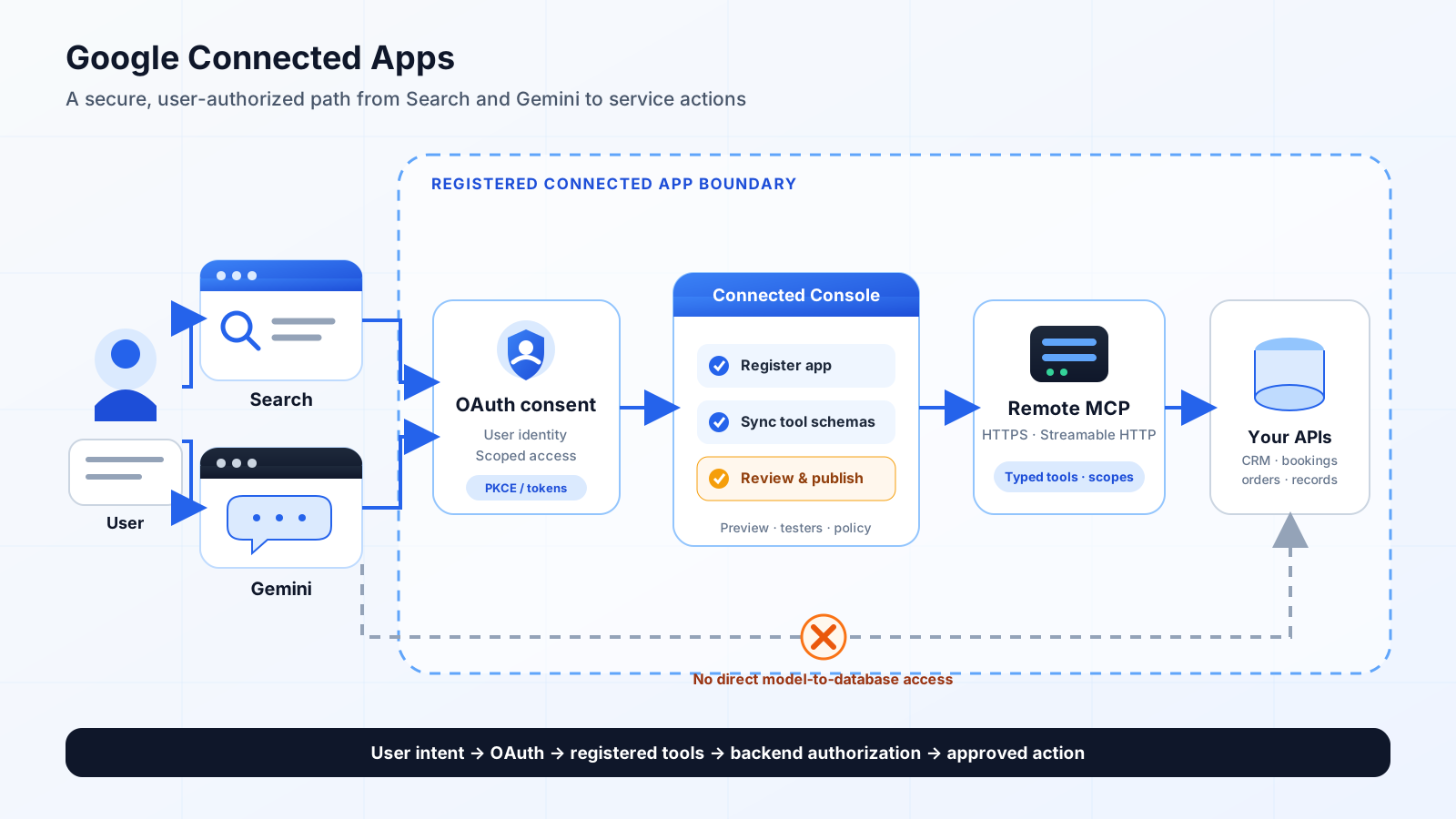
AI Search & MCP Engineering
Google Connected Apps: MCP Guide for Search & Gemini
Build a Google Connected App with a remote MCP server. Learn OAuth 2.1, tool schemas, platform policies, preview testing, and launch requirements.
A Connected App routes user-authorized requests through OAuth, a registered MCP endpoint, and the service's own backend authorization—not directly to its database.
Quick Answer
Google's Connected Apps Platform is a preview program that lets developers register a service so users can access authorized account data and complete useful actions from applicable Google products, including the Gemini app and Search. The recommended default for cross-platform integrations is a remote Model Context Protocol (MCP) server. It is not automatic MCP crawling, a search-ranking shortcut, or a replacement for a product data feed.
What Google announced on October 28, 2026
Google announced a unified Connected Apps Platform for building and managing integrations for Search and the Gemini app. Developers connect either a cloud-hosted remote MCP server or an Android integration built with AppFunctions, configure the app in Google Connected Console, test it, and submit it for review. Before review, developers choose the Google products in which the app should appear. Once live, Google says the console can report traffic, latency, and error rates. Access is being opened in phases, with more developers, markets, and products expected over the coming months; treat this as a preview, not a generally available distribution channel.
Start with Google's October 28 announcement and the Connected Apps Platform overview. The product documentation is the operational source of truth because preview requirements and supported surfaces can change.
What a Connected App is—and what it is not
A Connected App is useful when a Google product needs a user's live account context or needs to complete a real task in your service. Examples include checking a booking, retrieving an authenticated order, saving an item, drafting a support request, or changing a user-owned setting after confirmation. The service remains yours: you decide which tools exist, which account data is exposed, what permissions are required, and which actions need confirmation.
Google's quality guidance draws three important boundaries. A Connected App is not a replacement for an existing product data feed used for broad discovery. Moving the same read-only catalogue into a live tool call is not, by itself, a meaningful app integration. It is also not a way to obtain a more prominent display for general information. The value should be live, personalized context or an action that a user cannot already complete by asking a generic question. See Google's Connected Apps quality guidelines.
Choose the right integration path
| Path | Best fit | Important distinction | | --- | --- | --- | | Remote MCP server | Existing web APIs, account services, SaaS products, and cross-platform tools | Google's recommended default for foundational capabilities across applicable web and mobile surfaces. | | Android MCP with AppFunctions | Native Android features that depend on on-device state or tight OS integration | Runs through Android's AppFunctions path; it is not the same connection type as a remote MCP server. | Choose the connection type carefully: the Connected Console setup guide says one connection type is selected for each Connected App and cannot be changed later. If your service already has authenticated APIs, a remote MCP adapter is usually the more reusable starting point. If the core action depends on local Android app state, evaluate AppFunctions instead. Google's MCP developer guide explains the two paths.
Reference architecture
A practical remote-MCP architecture looks like this: 1. A user asks for information or an action in Search or Gemini. 2. The Google surface invokes a Connected App that the user has linked or explicitly selected. 3. The Connected App calls your public HTTPS MCP endpoint using the configured authorization model. 4. The MCP server exposes a small, statically defined set of tools and validates every argument. 5. Your application backend checks the user's identity, tenant, resource ownership, scope, and business rules. 6. The backend reads or changes the relevant system of record and returns a minimal structured result. 7. Sensitive or irreversible actions require explicit user confirmation, and your application records an audit event.
The model is not the authorization layer. Keep database access, tenant isolation, billing rules, and final permission decisions in your backend. The MCP server should be a narrow adapter over business APIs, not a direct tunnel into your database or an unrestricted command dispatcher.
Build a Connected App: an eight-step developer checklist
1. Pick one high-value user journey
Start with a task that needs a signed-in account, live data, or a state change. Good candidates include `get_order_status`, `find_available_appointments`, `save_favourite`, or `create_support_draft`. Avoid exposing a generic `search_everything` or `execute_action` tool that hides many unrelated operations behind one broad schema.
Write down the user, the account or resource being accessed, the expected result, the data required, and the side effects. Separate read-only operations from mutations before writing any MCP code.
2. Deploy a public remote MCP endpoint
Google's prerequisites require a publicly reachable HTTPS endpoint using Streamable HTTP, for example `https://api.example.com/v1/mcp`. A localhost endpoint or private intranet URL cannot be reached by Google's registration and testing services. Each Connected App supports one global MCP endpoint; separate data-centre URLs are not supported. Region-specific domains are appropriate only when the app is launching exclusively in that region.
If your edge firewall restricts source IPs, use Google's published user-triggered agent IP-range lists and refresh the allowlist rather than copying a static list into a long-lived runbook. Google documents the endpoint, IP allowlisting, and ownership checks in its Connected Apps prerequisites.
3. Verify domain ownership and publish the required metadata
Connected Console provides a verification token. Your server must return the corresponding JSON challenge directly at `https://<your-domain>/.well-known/google-connected-apps` with HTTP 200 and no redirect. The app also needs public-facing details: a concise description under 30 words, a 512 × 512 JPEG or PNG icon no larger than 1 MB, at least three high-value capabilities, at least three example prompts, and public Terms of Service and Privacy Policy URLs. At least two example prompts should begin with `@YourAppName`; another should mention the app name naturally.
The category selected during registration cannot be changed later. Choose the category that accurately represents the actual service and supported tasks, not the category that sounds most commercially attractive.
4. Design explicit MCP instructions and tool contracts
The MCP server guide recommends clear server instructions, explicit safety annotations, strongly typed input schemas, and useful parameter descriptions. For example, a read-only `get_order_status` tool should say which authenticated account it uses and which order identifier it accepts. A `cancel_subscription` tool should state its irreversible effect and require confirmation.
Use protocol annotations accurately: mark read-only operations with `readOnlyHint: true` and destructive or state-changing operations with `destructiveHint: true` where appropriate. Do not rely on the model to infer whether a tool is safe from its name.
5. Implement the correct authorization model
For user-specific data and actions, use a user-delegated authorization flow. Google's OAuth guide recommends OAuth 2.1 with Authorization Code and Proof Key for Code Exchange (PKCE); PKCE protects the authorization code from interception. Configure the exact redirect URIs shown for your Connected App, expose valid authorization-server metadata, request only the scopes needed for the declared user journeys, and handle token refresh and revocation correctly.
For genuine service-to-service access that does not represent an individual user's account, Connected Console also supports a machine-to-machine OAuth Client Credentials model. Do not choose this merely because it is simpler: if the action must be performed as the signed-in user, use user delegation and enforce resource ownership in your backend. See Google's OAuth 2.1 implementation guide.
6. Enforce platform and data policies before review
Connected Apps must statically declare callable tools in the console at registration. Google's policy prohibits dynamic tool-discovery functions such as `list_tools` or `get_schema`, and generic runtime dispatchers such as `execute_command` or `invoke_dynamic_tool`. Sensitive irreversible operations—including deleting data, changing access controls, or completing financial transactions—must carry `destructiveHint: true` or be marked as requiring user confirmation in the console.
The policy also requires data minimization and prohibits requesting or collecting users' prompts, full conversation context, or conversation history. Third-party advertising is not allowed. Agent-to-agent integrations are prohibited, and an app must not simply wrap or repackage a third-party API that the developer does not own, manage, or have explicit rights to use. Review the Connected Apps Platform policies before designing the tool surface.
7. Test locally and in Google's preview environment
Run the server locally and inspect tool definitions, arguments, and results with MCP Inspector. Then deploy the HTTPS endpoint and test it in Gemini Apps Developer Mode. Validate authentication, tool selection, error handling, user confirmation, and the actual output for both explicit `@AppName` prompts and natural-language requests.
Use test accounts with realistic seeded data. Do not test only the happy path: include expired tokens, missing scopes, wrong-tenant resource IDs, empty results, rate limits, duplicate requests, and attempts to invoke actions without confirmation.
8. Register, test with users, and submit for review
In Google Connected Console, create the app, select its category and connection type, add public metadata, verify the domain, configure credentials, sync the tool definitions, and select the products, countries, and languages for the preview version. Request only contextual signals—such as approximate location—when a tool genuinely needs them. The console supports explicit user-confirmation settings for tools.
Add preview testers and test the complete account-linking and action flow. Google reviews and tests the integration before it can be published to all users. A published version uses a snapshot of the tools and configuration; later tool changes require a new version and another review. The registration and publishing guide documents the current sequence.
Does a Google Connected App improve GEO rankings?
No documented Google policy says that registering a Connected App directly improves organic rankings, AI Overview citations, or the likelihood that an editorial page will be cited. Google describes brand attribution and discovery as benefits of the integration, but its own quality guidance says the integration type does not guarantee a more prominent UI for general information.
Treat Connected Apps as an additional product-distribution and task-completion surface—not a replacement for technical SEO, useful crawlable pages, structured data, product feeds, or accurate business information. GEO still depends on whether your public content is discoverable, specific, trustworthy, current, and attributable. A Connected App can complement that foundation when users need live account context or to complete an action.
This distinction matters for existing MCP/GEO architecture too: a public MCP endpoint is not automatically a Google Connected App. Google requires a registered integration, domain verification, tool synchronization, testing, and review before selected Google products can invoke it. For the broader web architecture, see HiMat's MCP and live RAG API binding guide.
Measurement: what to track after approval
Google says Connected Console can report traffic, latency, and error rates. Instrument your own backend for the additional measures that explain whether the integration is useful: account-link completion, authorization failures, tool-call success, task completion, confirmation abandonment, duplicate actions, p50/p95 latency, and support incidents. Separate read-only usage from successful mutations, and measure completed user outcomes rather than raw tool calls.
Do not treat a spike in tool invocations as business value. A healthy integration should complete the intended user task with the minimum data and permissions required, while keeping failures and unintended side effects low.
How HiMat Technologies resources fit
HiMat's AI Agent Development service covers bounded agents, tool/API gateways, scoped credentials, approvals, and audit trails. The AI Software Development service is relevant when the integration must become part of an existing SaaS or customer-facing product. For public discovery and accurate AI-search representation, see Technical SEO & GEO.
Two free tools can support adjacent development tasks: the MCP Server Config Generator creates and validates local client configuration files for supported MCP clients; it does not register a Google Connected App or generate a remote server. The MCP Security & Permission Auditor performs browser-local static checks on MCP client/server configuration manifests; it is not a Google policy certification or a live penetration test.
Frequently asked questions
What is Google's Connected Apps Platform?
It is a preview platform for developers to register services that users can access from applicable Google products, including Gemini and Search. The integration exposes selected, authorized data and actions through a remote MCP server or an Android AppFunctions integration.
Is the Connected Apps Platform generally available?
No. Google's October 28, 2026 announcement describes a preview with phased access. Developers must apply for access, configure the integration, test it, and pass Google's review before publishing to selected products and markets.
Do I need an MCP server to build a Connected App?
Not always. A remote MCP server is Google's recommended default for foundational cross-platform capabilities. Android MCP with AppFunctions is the alternative for deeper native Android functionality and on-device context.
Does registering a Connected App improve Google rankings?
There is no documented ranking guarantee. The platform provides a way for users to access a service and complete tasks from supported Google products; it does not replace crawlable content, feeds, structured data, or ordinary SEO.
Should every MCP tool require user confirmation?
No. Read-only queries can usually run within their authorized scope. Sensitive or irreversible actions must be marked as destructive or configured to require explicit confirmation. Your backend must still enforce identity, ownership, and business rules.
Can I expose a generic execute-command tool?
No. Google's Connected Apps policy prohibits generic runtime dispatchers and dynamic tool-discovery functions. Declare narrow, well-described tools with typed schemas and explicit safety annotations.
Can one Connected App use different regional MCP endpoints?
Each Connected App supports one global MCP endpoint. Separate data-centre URLs are not supported; a region-specific domain is suitable only when the app is launching exclusively in that region.
Conclusion
Google Connected Apps creates a new, explicitly registered path for services to participate in user journeys across Search and Gemini. The opportunity is not to expose every API or chase a new ranking signal. It is to make a small number of genuinely useful, account-aware tasks available through a secure MCP contract, with least-privilege authorization, clear confirmation boundaries, and measurable outcomes. Build the service first, validate the user journey, then apply for the preview and publish only after review.
Previous Article
Akamai Agent Sandbox: WebAssembly AI Execution GuideNext Article
Dependabot for APM: Update AI Agent Skills SafelyExplore other service pillars
Related articles
- Technical SEO & GEO EngineeringGEO Model Context Protocol (MCP) & Live RAG API Binding in 2026: Exposing Technical Web Systems to Authorized AI ApplicationsLearn how authenticated MCP endpoints and live RAG API bindings can expose selected data and tools to AI applications that explicitly support and are authorized to use them—without assuming that search engines automatically call public MCP servers.
- Technical SEO & GEO EngineeringGEO Agentic Context Governance: A Practical Zero-Trust ArchitectureA practical guide to governing enterprise AI retrieval with identity-aware access, data minimization, redaction, source provenance, and audit trails, with implementation patterns and validation guidance.
- AI Security & Agentic EngineeringAI Agent Identity in 2026: Why Least-Privilege Access Is Becoming the New Security PerimeterAI agents are moving from chat interfaces into APIs, SaaS tools, cloud platforms, and business workflows. Learn how to give agents their own identity, scoped permissions, short-lived credentials, delegation controls, and auditable actions without turning automation into an over-privileged security risk.